
My Health at Vanderbilt
Vanderbilt University Medical CenterMedical
4.71.26K Reviews
- Version
- 11.8.3
- Installs
- 100.00K
- Age Rating
- Everyone
Screenshots
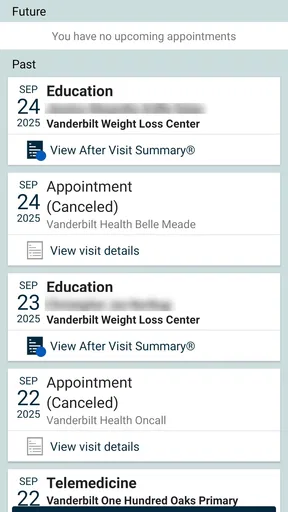
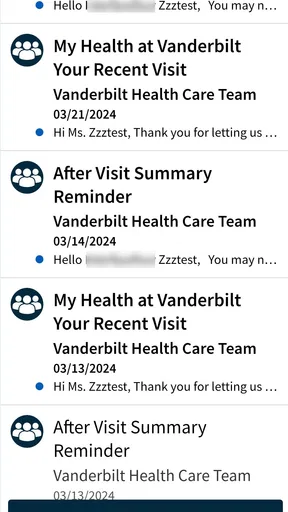
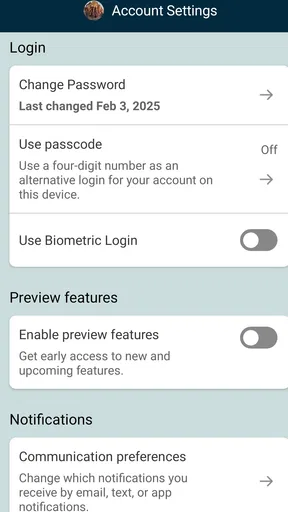
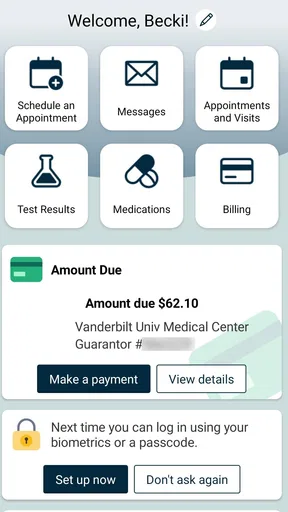
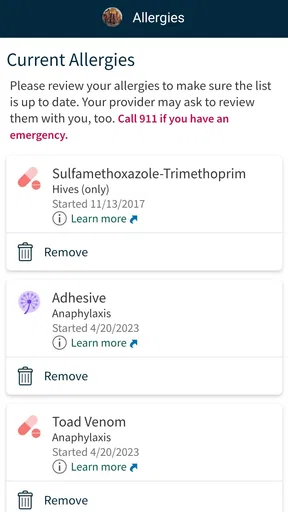
Our Review of My Health at Vanderbilt
 Analysis by Appyee
Choosing a medical app is different from choosing another everyday download. I want the first screen to feel understandable, the sign-in process to respect the seriousness of personal health information, and the app to help me complete a useful task rather than simply display a polished dashboard. My Health at Vanderbilt is built around that practical purpose: it gives Vanderbilt patients a digital way to reach their health record and manage parts of their care from a phone.
In my experience, My Health at Vanderbilt makes the most sense for people who already receive care through Vanderbilt University Medical Center. It is a free medical app developed by Vanderbilt University Medical Center, rated for Everyone, and it has built a substantial user base with over 100,000 installs. Its average rating is 4.7 from around 2,500 ratings, which suggests that many users find it useful, although a rating alone cannot tell you whether it fits your particular care routine.
What to expect before you begin
The important thing to understand is that this is not a general health encyclopedia, symptom checker, fitness tracker, or replacement for urgent medical help. Its value comes from being connected to a specific healthcare system. If Vanderbilt is not involved in your care, the app is unlikely to become a meaningful part of your day, no matter how convenient the interface may be.
That focus is also its main advantage over many usual alternatives. A general health app may collect wellness information, store notes, or offer educational material, but it usually does not serve as the patient-facing doorway to one medical organization. My Health at Vanderbilt is more useful when I need to interact with my existing care relationship rather than build a separate personal health archive.
I would approach the app with a simple expectation: it should help me get to my Vanderbilt health information and related patient tasks more conveniently than making a separate trip to a computer or relying on paper records. The experience is most valuable when I already know what I need to check, prepare, or follow up on.
The app has been available since May 18, 2016, and the current version is 11.8.3. It requires at least iOS 11, so anyone using an older Apple device should check compatibility before planning around it. That requirement is not especially demanding for a modern phone, but it is worth noticing if the device is old or has not been updated for a long time.
Because this is a medical record app, I would also avoid treating it as the only place where important information exists. A phone can be lost, damaged, offline, or unavailable at exactly the wrong moment. For appointments, medication questions, or instructions that matter, I would still keep the relevant details accessible in another safe way and contact the appropriate healthcare professional when the situation calls for it.
Who will get the most from it
The best match is a Vanderbilt patient who wants a more direct way to stay organized between visits. That could include someone preparing for an appointment, checking information after a consultation, or trying to reduce the small amount of friction involved in managing care. It can also be useful for a family member helping an older adult, provided that person uses the proper authorized access and respects the patient’s privacy.
I would be less enthusiastic about recommending it to someone who wants one universal app for records from several unrelated healthcare providers. A hospital-specific app can be excellent for one care network while still being incomplete as a whole-life health organizer. If your doctors are spread across different systems, you may need to use multiple patient portals or a separate method for keeping your own overview.
Setting it up without making the first day confusing
My advice is to install it when you have a few quiet minutes, not while standing in a waiting room or rushing to an appointment. The first meaningful success is not merely opening the app; it is reaching your own health information and recognizing that the account is connected to the right patient relationship. Giving yourself time makes it easier to notice mistakes before they become stressful.
Start with the account details associated with your Vanderbilt care. Enter information carefully, especially anything that identifies you. If the app asks you to authenticate your identity or connect to an existing patient account, treat that step as part of the security process rather than unnecessary obstruction. Medical information deserves more care than a casual social app login.
I would avoid creating a second account impulsively if the first attempt does not work. Duplicate accounts can make it harder to understand which profile is connected to your record. Instead, pause and review the sign-in or account-recovery instructions presented in the app. If the problem is related to your healthcare account rather than the phone itself, the appropriate Vanderbilt support route is more likely to help than repeatedly reinstalling the application.
Once inside, take a moment to learn the layout before tapping through every available area. Patient portals often place several kinds of information close together, and a hurried tap can lead you into a section that is not relevant to the task you had in mind. I find it helpful to decide on one goal for the first session: locate the record area, review information connected to a recent visit, or prepare for an upcoming interaction with the care team.
The safest setup habit is to confirm that you are viewing your own account before acting on any health information. This matters even more when a phone is shared, when a caregiver helps a family member, or when more than one person has used the device. Convenience should never replace a quick identity check.
Privacy also deserves practical attention. I would use the app on a personal device with a screen lock and avoid leaving it open where other people can read the display. Notifications can be convenient, but medical details appearing on a lock screen may not be appropriate for everyone. Review the phone’s notification behavior and choose a level of visibility that matches your living situation.
The first successful action I would try
After signing in, I would not begin by exploring randomly. I would choose a recent, low-pressure task that lets me verify the account and understand how the app presents information. For example, I might look for the record connected to a recent Vanderbilt visit and check whether the details make sense to me. This gives the app a clear test: can I reach relevant information without confusion?
A useful second step is to prepare for the next conversation with a clinician. Rather than trying to memorize every detail, I would use what I can see in the record to write down questions separately. The app can help me arrive better prepared, but it should not encourage me to interpret medical information beyond my understanding. A record is valuable context, not automatically a diagnosis or a personal treatment plan.
For a realistic everyday scenario, imagine that I have a Vanderbilt appointment later in the week and I am unsure what information I need to bring. I open the app at home, review the relevant patient information, and make a short list of questions while I am calm. If I notice something I do not understand, I mark it for discussion instead of searching for a quick conclusion. The success here is not completing every possible task; it is reducing uncertainty before the appointment.
Another practical use is checking information after a visit, when details can blur together. I may remember the broad conversation but forget a specific instruction or the name of a test. Returning to the app can help me review what is available through the Vanderbilt record. I still treat any confusing or urgent matter as something to clarify with a qualified healthcare professional rather than guessing from a screen.
This deliberate approach also helps reveal whether the app fits my habits. Some people want a portal they consult only when needed, while others prefer to review health information regularly. I would not force a daily routine simply because the app is installed. Medical information is most useful when it supports a real decision, appointment, or follow-up rather than becoming another source of unnecessary checking.
Where first-time users may hesitate
The biggest possible source of confusion is the difference between the app and the healthcare organization behind it. The developer is Vanderbilt University Medical Center, but that does not mean every medical record from every provider will appear in one place. I would think of it as a Vanderbilt-centered patient connection, not a universal container for all health information.
That distinction matters for people who recently changed providers or receive care in several locations. If one part of your medical history is elsewhere, you may need to consult that organization separately. This is not a reason to dismiss the app; it is simply a boundary to understand before relying on it as your complete medical picture.
Another common misunderstanding is expecting the app to replace communication with a care team. Digital access can make information easier to reach, but it does not remove the need for professional interpretation. If a result, instruction, or record entry seems unclear, I would use the appropriate clinical contact method rather than making a treatment decision from the app alone.
It is also important to separate routine access from urgent care. A patient portal is not the place I would depend on for an emergency or a rapidly worsening symptom. In those situations, I would use emergency services or the urgent-care guidance appropriate to the situation. The app is best viewed as a tool for organized access and follow-up, not as an instant response channel for every health concern.
Login trouble can create a different kind of frustration. When an account does not open, the cause may be the credentials, the patient relationship, the device, or the service itself. I would first check the basics without repeatedly guessing passwords. Then I would use the official account-help path associated with Vanderbilt rather than asking an unrelated third party to troubleshoot access to sensitive information.
People helping relatives should be especially careful. Sharing a phone or handing over a password may feel efficient, but it can blur responsibility and privacy. I would use any proper access arrangement offered through the healthcare relationship and make sure the patient understands who can see the information. The convenience of caregiver support should not come at the cost of unclear control over a medical record.
How it compares with familiar alternatives
Compared with paper documents, the app is more convenient when I need to review Vanderbilt-related information away from home. Paper can be easier to annotate and keep as a backup, but it becomes difficult to update and organize. The app has the opposite trade-off: it is easier to carry and revisit, but it depends on a working device, an accessible account, and my ability to understand the digital presentation.
Compared with calling a clinic, a patient portal can reduce the need for a phone conversation when the information I need is already available digitally. That is helpful for simple preparation and record review. A phone call remains better when I need clarification, when the information seems wrong, or when the issue is urgent and waiting for an online interaction would be inappropriate.
Compared with a general health organizer, My Health at Vanderbilt has a narrower purpose and a stronger connection to Vanderbilt care. A general organizer may be better for combining information from several providers, tracking personal notes, or maintaining a broad wellness journal. I would use such an alternative alongside this app only if I needed a wider overview, not because the Vanderbilt-focused approach is a weakness by itself.
Compared with a desktop browser, the mobile app is more natural for quick checks while moving through the day. A larger screen may still be preferable when I want to read a long record carefully, compare several details, or work through information that feels dense. The phone format wins for access; the computer can win for extended review.
Making the app useful beyond the first login
After the initial setup, I would turn it into a preparation tool rather than a passive archive. Before a Vanderbilt visit, I could review what I already know, write down questions, and identify details that need clarification. Afterward, I could return to the record when I need to refresh my memory. This simple before-and-after habit is more useful than opening the app without a purpose.
A second tip is to keep interpretation separate from retrieval. The app can put information in front of me, but I should not confuse access with understanding. When a medical term or result is unfamiliar, I would record the question and bring it to the care team. That approach prevents a common digital-health mistake: treating an isolated entry as if it explains the whole situation.
A third tip is to plan for account recovery before an appointment becomes time-sensitive. I would make sure I know which sign-in details belong to the account and where to find the official help route. Doing this during a calm moment is far easier than trying to solve access problems immediately before care.
I would also review the app after updates rather than assuming every screen works exactly as before. The current version is 11.8.3, and keeping the application current can be sensible for compatibility and security. At the same time, I would not update blindly just before an important appointment if I have no time to sign in again and confirm that everything is familiar.
The free price removes an obvious barrier, but it does not remove the practical requirements of having Vanderbilt care, a compatible device, and a usable account. That is why I would judge the app by how well it supports my actual healthcare relationship, not by the fact that it costs nothing to download.
For a first-time user, my recommended path is straightforward: install it on a private, supported device; sign in carefully; verify that the account and record look right; complete one low-pressure review task; and then use the information to prepare a real question or appointment. If that sequence feels smooth, the app has already earned a place in your healthcare routine.
My final view is positive but specific. My Health at Vanderbilt is a focused medical app for Vanderbilt patients who want their health record closer at hand. Its strongest quality is not an endless collection of extras; it is the practical connection between a patient and one healthcare system. I would recommend it to someone who receives Vanderbilt care and values convenient record access, especially before and after appointments.
I would skip it as a primary solution if my healthcare is spread across unrelated organizations, if I need a broad wellness tracker, or if I expect a portal to answer urgent medical questions instantly. For the right user, though, it can make routine healthcare administration less scattered. Used with sensible privacy habits and realistic expectations, it offers a reassuring first step from installation to meaningful access rather than another app that simply occupies space on a phone.
Verdict
Strengths of My Health at Vanderbilt
- Secure access to Vanderbilt Health records, appointments, and test results.
- Easy prescription refill requests and medication information management.
- Direct messaging helps patients communicate with care teams conveniently.
- Useful health reminders can support appointments and preventive care.
- Integrated access to telehealth services may reduce unnecessary clinic visits.
Limitations of My Health at Vanderbilt
- Some features may only work for Vanderbilt Health patients.
- Certain results or records can be delayed before appearing in the app.
- Messaging response times depend on the clinic and may not be immediate.
- The app requires reliable internet access for most functions.
- Older devices may experience slower performance or compatibility issues.
Similar Picks in This Category
View All
WebMD: Symptom Checker
WebMD, LLC4.1

Microphone Amplifier
DOSA Apps4.2

Anatomy Learning - 3D Anatomy
3D Medical OU4.5

Period Tracker and Calendar
SimpleInnovation4.9

GoodRx: Prescription Coupons
GoodRx4.8

CVS Health
CVS Pharmacy4.5
Frequently Asked Questions
What is My Health at Vanderbilt?
My Health at Vanderbilt is Vanderbilt University Medical Center’s patient portal app for managing healthcare from an Android or iOS device. After signing in, patients can typically review parts of their medical record, check test results, view upcoming appointments, request prescription refills, communicate with care teams, and manage certain billing or insurance details. Available features may depend on your relationship with Vanderbilt and the services connected to your account.
Who can use the My Health at Vanderbilt app?
The app is intended primarily for patients receiving care through Vanderbilt University Medical Center and eligible Vanderbilt-affiliated providers. You generally need an active My Health at Vanderbilt account and valid login credentials to use the main features. Parents, guardians, or approved caregivers may also receive proxy access for another person, although access levels and eligibility can vary by age, authorization, and Vanderbilt’s policies.
How do I sign up or log in to My Health at Vanderbilt?
To use the application, you normally sign in with the username and password associated with your My Health at Vanderbilt account. New users may need an activation code from Vanderbilt or must complete the online enrollment process using information requested by the portal. If you forget your password, cannot verify your identity, or have trouble activating the account, use the recovery options or contact Vanderbilt patient support rather than creating multiple accounts.
What can I do through My Health at Vanderbilt?
The app brings several routine healthcare tasks together in one place. Depending on your account and the services available at the time, you may be able to schedule or review appointments, receive test and imaging results, read visit summaries, send secure messages, request medication refills, review care instructions, and access selected billing information. It is convenient for organization, but some requests may still require a phone call or in-person visit.
Is My Health at Vanderbilt a replacement for emergency medical care?
No. My Health at Vanderbilt is a patient-management and communication tool, not an emergency service or substitute for professional medical evaluation. Do not rely on portal messages or app notifications when experiencing severe symptoms, chest pain, difficulty breathing, signs of stroke, serious injury, or another urgent condition. Call emergency services immediately or go to the nearest emergency department. For non-emergency technical or medical questions, contact the appropriate Vanderbilt support or care team.
